Your TV is tracking you. Disrupt it now.
Smart TVs use ACR to recognize what you watch, and come stuffed with apps you never chose. Our app helps you turn off the tracking and clear the clutter.
 BeforeAfter
Works with


- VIZIO
- Insignia
- PHILIPS

Out of the box
Your TV is watching back.
It recognizes what’s on your screen.
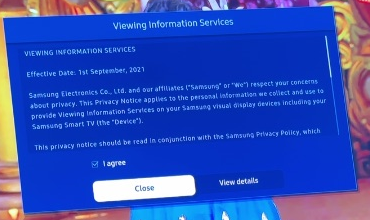
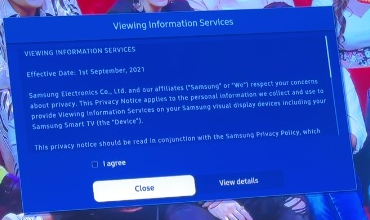
Samsung calls it Viewing Information Services. It was switched on when we checked our first TV.
It uses that to target ads.
Interest-Based Advertisements was on too, along with Samsung’s own ad-supported channels.
It came with 25 app packages.
13 of them were apps the household never wanted.
Not just us
Don’t take our word for it.
Reviewers, researchers and regulators have all looked at what smart TVs collect.
Research · IMC 2024
UCL, UC Davis and UC3M
Samsung and LG TVs ran screen recognition even on HDMI inputs. Switching it off in settings stopped it completely.
Read the studyLawsuit · December 2025
Texas Attorney General
Sued Sony, Samsung, LG, Hisense and TCL over screen tracking. Samsung later agreed to require express consent in Texas.
Read the releaseSettlement · 2017
US Federal Trade Commission
Vizio paid $2.2 million over viewing data it collected from around 11 million TVs without proper consent.
Read the release
How it works
Four steps, guided from your phone.
No technician, no factory reset. You stay in control the whole way.
Pick your brand and model. The app checks what your TV lets you change before you pay anything.
Viewing-data tracking, ad personalization, preinstalled apps. See exactly what’s switched on.
Keep the apps you watch. Pick what to switch off and remove. Nothing changes until you approve.
Clear steps on your phone, with a quick camera check when it matters. You keep a record of every change and how to undo it.
Which TV is this?
Tested on a real TV
Our first cleanup.
A Samsung AU8000, cleaned up in October 2026.
- unwanted app packages removed
- 13
- favorite apps kept
- 8 of 8
- viewing-data tracking
- Off
- ad personalization
- Off
Pricing
Simple, one-time pricing.
Pay once per TV, no subscription. Start with Essential; Total Protection is on the way.
Choose your planPay once per TV. No subscription.
| EssentialUS$49one time, per TV | Total ProtectionUS$199Coming soon |
|---|---|---|
| Tracking settings | ||
| Viewing data / screen recognition (ACR) off | ||
| Personalized ads off and ad ID reset | ||
| Voice recognition data sharing off | ||
| Usage and customization data sharing off | ||
| Cleanup | ||
| Unwanted preinstalled apps removed | ||
| Clean, Apple TV-style home screen | ||
| No ads on your home screen | ||
| Your favorite apps and sign-ins kept | ||
| Your data kept locally and safe | ||
| Total ProtectionComing soon | ||
| Tracking and ad servers blocked at the network level | ||
| Diagnostics and usage reports with no off switch blocked | ||
| Tracking switched off inside streaming apps | ||
| Re-check after software updates for a year | ||
Free to check. You pay only once your TV is confirmed supported.
From the blog
Know what your TV is up to.
 Field notes · 6 min read
What we found when we cleaned up our first TV
Twenty-five app packages, two tracking consents, and an ad channel the household didn’t want. Notes from our pilot on a Samsung AU8000. Explainer · 7 min read
What your smart TV knows about you
Your TV can recognize what’s on its screen and report it. Here’s how that works, what researchers found, and what you can switch off. Guide · 5 min read
How to turn off ACR tracking on a Samsung TV
The two settings that matter most, where Samsung puts them, and what changes when you turn them off.
Questions.
Straight answers about what it does and doesn’t do.
What is ACR on a smart TV?
ACR (automatic content recognition) is how a smart TV recognizes what’s on its screen, from apps, antenna or anything plugged in over HDMI, and reports it back to the TV maker for ads and analytics. Samsung calls it Viewing Information Services, LG calls it Live Plus, and Vizio calls it Viewing Data.
How do I turn off ACR on my TV?
It’s a setting, but it’s buried. On Samsung it’s under Terms & Privacy, on LG under Additional Settings, and on most TVs ad personalization is a separate switch. Our app finds the right settings for your exact model and walks you through turning them off. Researchers found that once ACR is switched off, the TV stops sending that data.
When can I use it?
The app is in development. Check your TV now and we’ll confirm whether your model is supported, then invite you as soon as it’s ready for you.
What exactly does it change?
The optional tracking settings your model offers, like viewing-data collection and ad personalization, and the preinstalled apps it lets you remove. On some models you can also set a simpler home screen. You approve every change first.
Does it remove spyware?
Not yet. Most TV tracking is built into the TV’s own software, and the Essential plan switches off the tracking settings your model offers. Total Protection will also block the tracking that settings can’t reach. It isn’t available yet, and we won’t sell it until it works. Join the waitlist on the pricing card to hear first.
Will I lose my apps or settings?
No. You choose which apps stay, and there’s no factory reset. Removing an app can delete its data and need a new sign-in if you reinstall it, so the app tells you before it’s removed.
What if my TV isn’t supported?
Then you don’t pay. We’ll tell you, and keep you on the list for when it is.
Will my TV be faster or ad-free?
Your new home screen has no ads. Ads inside streaming apps or the TV’s own menus may still appear, and we don’t promise a faster TV. Switching off tracking reduces what’s collected; it isn’t a guarantee of zero tracking.
Take your TV back.
Tell us your model. It takes a minute, and checking is free.